Domain Transfer
Transfer Your Domain To Hosted.com®
Move your domain to Hosted.com® and manage your renewals, DNS records, redirects, and security from one easy-to-use Customer Portal with expert support. Enter your domain name to start your transfer request.

Transfer your domain to Hosted.com®
Before You Transfer Your Domain
A domain transfer moves the management of your domain name from one provider to another, including settings, renewals, and DNS (Domain Name System) records. It doesn’t move your hosting, website files, or email accounts unless you decide to transfer them as well.
Before you transfer your domain, it helps to have a few details ready to help the process go smoothly and reduce the chance of delays or a failed transfer.
Use this checklist before you submit your request:

Unlock your domain with your current provider so it can be transferred when you are ready.
Request your EPP code. Also called an authorization code, auth code, transfer code, or transfer key.
Check that your domain is not still in the first 60 days of registration or a recent transfer.
Make sure the domain is active and not expired, in redemption, or pending deletion.
Confirm that you have access to the registrant or admin email address linked to the domain.
Review your DNS and nameserver settings before making any changes, especially if your website or email is live.
Check your account with your current provider for any unpaid balance or transfer restrictions.
Confirm any special rules for your domain extension, as some have extra requirements.
Once you’ve checked all the boxes, you can start your transfer request through Hosted.com® with fewer delays.
Request Domain TransferHow to Transfer Your Domain to Hosted.com®
Transferring your domain to Hosted.com® is straightforward when your domain is prepared for release, and your transfer details are correct. The process starts with your current provider and ends with the transferred domain in your Hosted.com® account.

Moving more than one domain?
Hosted.com®’s Bulk Domain Transfer option easily moves multiple domains at the same time.
What’s Included When You Transfer a Domain to Hosted.com®?
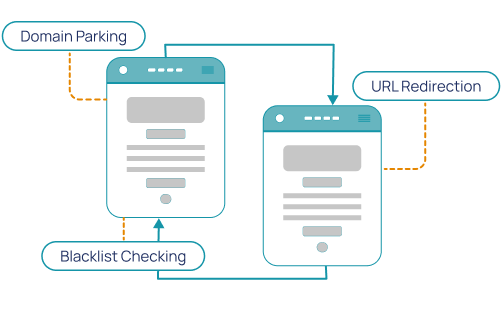
When you transfer your domain to Hosted.com®, you get more than Registrar management. You also get tools to manage, protect, redirect, monitor, and prepare your domain for your website, email, or future online project.

Domain Parking
Keep your domain name reserved while your website, blog, online store, or landing page is being planned or built.
Blacklist Checking
Check whether your domain has been flagged before you build around it. This can help you spot potential reputation issues early.
Simple Management
Manage DNS, renewals, redirects, and domain settings from one intuitive Hosted.com® customer portal.
Expert Support
Get help with domain transfers, DNS setup, registrations, hosting-related questions, and next steps after your transfer.
DNS Hosting
Use Hosted.com®’s geo-redundant DNS hosting & manage your domain pointing to your website, email, or online services.
URL Redirection
Forward your domain to an existing website, landing page, online store, booking page, or social profile.
1-Click DNSSEC
An extra layer of DNS protection. DNSSEC helps protect users from certain types of DNS spoofing and redirection attacks.
Uptime Monitoring
Monitor whether your website is online and reachable, so you can respond faster if something needs attention.
Why Transfer Your Domain to Hosted.com®?
Transferring your domain to Hosted.com® gives you all the tools to manage your domain and connect it to the services you need in one place. Whether you are moving one domain or multiple domains, we help keep the process streamlined, transparent, and hassle-free.

Will My Website or Email Go Down During a Domain Transfer?
A domain transfer only changes where your domain is managed, not where your website or email is hosted. Those hosting services are separate from your domain registration. Your website and email can often continue working as normal during the transfer if your DNS and nameserver settings are not unexpectedly changed.
Before starting the transfer, check your DNS settings and make sure they are not automatically switched to “Default” by your current provider, so your site and email still stay available. If you are unsure as to what to look for, Hosted.com®’s support team can help you understand your DNS setup before you make any changes.
Need help checking your settings?
Contact Domain SupportWhat Can You Do After Transferring Your Domain?
Once your domain is transferred, you can manage it through Hosted.com® and decide how you want to use it next. You can connect it to hosting, create a professional email address, add an SSL, forward it to another website, or keep it parked until you are ready to launch.
What is a domain name transfer?
A domain transfer moves your domain name’s management from one provider to another. It does not move your website files, hosting, or email by itself. After the transfer, you manage the domain, renewals, DNS, and related settings through the new provider.
Will my website go down during a domain transfer?
A domain transfer does not usually affect your website files or hosting. Your site will usually stay up if your DNS and nameserver settings are not reset during the process. Review your DNS records before starting the transfer to avoid potential downtime.
How long does a domain transfer take?
Most domain transfers take around 5–7 working days, depending on the domain TLD, current provider, authorization code, and approval process. Transfers may be delayed if the domain is locked, is recently registered, expired, or is missing the correct EPP/auth code.
What Customers Say About Hosted.com®
See why our customers choose Hosted.com® for fast, secure hosting and quick domain registration with easy website management and professional email solutions.
Frequently Asked Questions
Find clear answers to common questions about Domain Registration, Web Hosting, WordPress Hosting and website security. Our FAQs explain the basics - from choosing a domain to cPanel Web Hosting and protecting your site - in simple, easy-to-follow steps.

Registrars vary across the board, some offer good prices, others great customer service, we at Hosted.com® offer all of that, plus security and reliability, so that your customer experience with us is the best in the domains and hosting environment.
Firstly, please ensure that you have no arrears on your current provider's account and inform them that you are going to transfer your domain, and/or hosting, then speak to your new provider (US!!!). We will advise you as to the process, bearing in mind that both of us (your current provider and Hosted.com®), have to provide authorization for the transfer.
NOTE: You will be unable to transfer a newly purchased domain within the first 60 days after registration.
It can usually take approx. 7 days, to transfer a domain however, this is reliant on Hosted.com® receiving the co-operation and correct information from your current hosting provider.
The transfer fee is always dependent on the provider that you are transferring to. As a rule of thumb, most providers will charge the annual renewal fee of the domain, which could be (but is not limited to) between $10 to $15. Other contributing factors that may influence pricing are the domain extension and if it is a premium domain name.
Disclaimer, these prices were only valid at date of publication, please reference our website for current pricing, or contact our Sales Team. E&OE.
Please reach out to us so we can advise you as to exactly where your domain is, in the transfer process. You can also check your domains in our easy to use Domain Management Control Panel, under Manage Services - Domains. This will indicate exactly what the status is for all your domains, whether they are pending, in a transfer process, or about to expire.
Yes, you can easily point your transferred domain to any website that is not hosted with us. Hosting with Hosted.com®, is not a prerequisite to the transferring of domains.