 Contact Support
 Sign In


When you visit a website, you often see small links at the top of the page that show where you are and how you got there. These links are called breadcrumbs. They help users understand their location on a WordPress site and how they can return to previous pages without using the back button.
This guide shows you how to add WordPress breadcrumbs. We discuss different methods, including using plugins, widgets, themes’ built-in breadcrumb feature, and manual coding. We also explore how to customize breadcrumbs to match your WordPress site’s design and how to make them work seamlessly on all devices.
KEY TAKEAWAYS
- Breadcrumbs help users understand their location on a site and easily navigate back to previous pages.
- Adding breadcrumbs to WordPress can improve user experience and boost SEO by creating a clear content hierarchy.
- You can use plugins like Yoast SEO, AIOSEO, or Breadcrumb NavXT to add and customize breadcrumbs without coding.
- Themes, including OceanWP and Astra, offer built-in breadcrumb features you enable through Customizer or using shortcodes.
- If you don’t want to use plugins or theme support, you can manually add breadcrumbs by inserting custom PHP code in theme files.
- Always style your breadcrumbs using CSS to match your site’s design and ensure consistency across all pages.
- Test your breadcrumbs on different devices to confirm they’re responsive and accessible to all users.
- Regularly update your breadcrumbs whenever you add new content or restructure your website to maintain accuracy and relevance.
TABLE OF CONTENTS
What Are Breadcrumbs in WordPress?
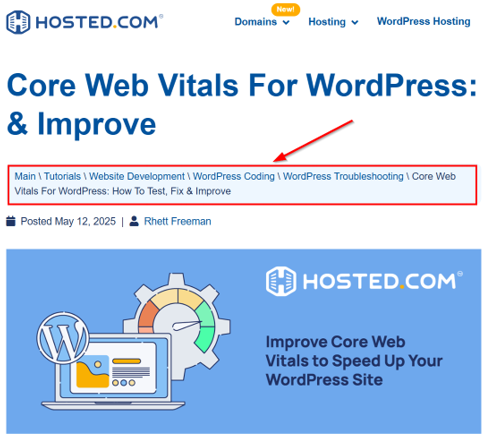
A breadcrumb is a set of links that shows users their location on a website and how they got there. These are the navigational links that show the path from the website’s homepage to the current page.
It usually appears at the top of a page and looks something like this:
Home → Blog → WordPress Tutorials → How to Add BreadcrumbsThe > is the separator that may vary from website to website. Each link in the breadcrumb path helps users return to previous pages with a single click.
Breadcrumbs are crucial for user experience (UX) because they ensure you can navigate a website easily. Imagine you’re on a WordPress hosting company’s specific article page. Instead of hitting the back button several times, you can use the breadcrumb trail to jump straight to the main category or the homepage. This simple navigation tool keeps visitors from feeling lost and encourages them to explore more pages.
WordPress breadcrumbs also play a key role in search engine optimization (SEO). They help search engines understand the structure of your website, which makes it easier to crawl and index your pages.
When search engines can easily follow breadcrumb links, they can better identify your content’s hierarchy. This can improve how your WordPress website appears in search results, especially when rich snippets are enabled.

In short, breadcrumbs are more than just links; they guide users, improve navigation, and support SEO.
How to Add Breadcrumbs using a WordPress Plugin
Adding breadcrumbs to your WordPress site can be done in several ways. You can use plugins, themes with built-in breadcrumbs support, or even custom code. Each method has its pros and cons, but plugins are the easiest option for beginners. Let’s start by exploring how to add breadcrumbs using a plugin.
Plugins make it simple to add WordPress breadcrumbs. Here are some popular breadcrumb plugins:
- All in One SEO (AIOSEO): Includes a built-in breadcrumb feature that integrates with your SEO settings.
- Yoast SEO: Offers breadcrumb settings that work with most WordPress themes.
Now, let’s go through the steps to install and set up a breadcrumb plugin.
Go to your WordPress Admin Dashboard. Click Plugins → Add New. In the search bar, type the name of the plugin (e.g., Yoast SEO or All in One SEO). Click Install Now, then Activate.
Once the plugin is activated, you’ll need to set up the WordPress breadcrumb settings. Here’s how:
For Yoast SEO
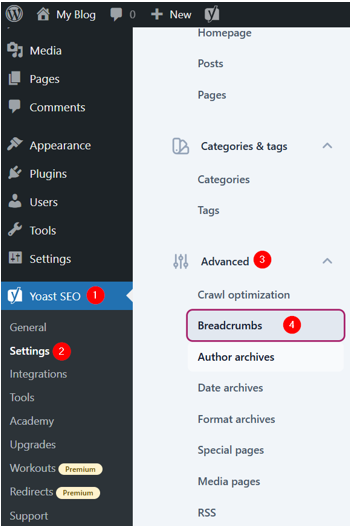
Navigate to Yoast SEO → Settings. In the left-side menu, click Advanced and select Breadcrumbs.
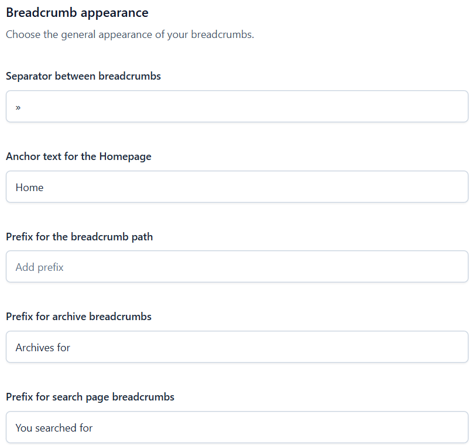
Here, you can configure the breadcrumb settings as you wish, such as the separator and prefix for the breadcrumb path.
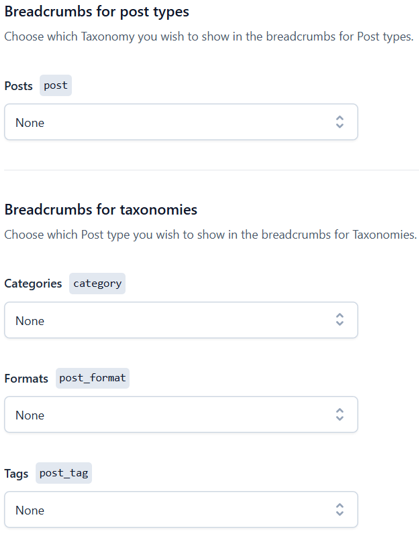
Select the WordPress taxonomy you want to display in the breadcrumbs for post types. Next, choose the post type you’d like to show in the breadcrumbs for taxonomies.
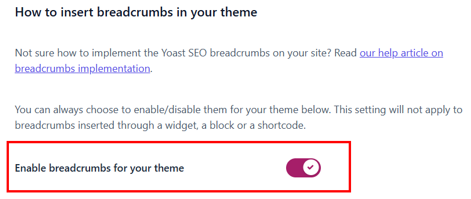
You can turn your theme on or off using Enable breadcrumbs for your theme. This setting won’t affect breadcrumbs added through a widget, block, or shortcode.
Once done with the configurations, click Save changes.

If your theme doesn’t support Yoast breadcrumbs by default, you’ll need to insert a code snippet into your theme’s template files. Here’s how:
Go to Appearance → Theme File Editor in your WordPress dashboard.
Open the template file where you want the breadcrumbs to appear, such as single.php, page.php, or header.php (in our example, we want to add breadcrumbs in posts, so we edit the single.php file).
Next, insert the following code where you want the breadcrumbs to display:
<?php
if ( function_exists('yoast_breadcrumb') ) {
yoast_breadcrumb('<p id="breadcrumbs">','</p>');
}
?>
Then, click Update File to save your changes.
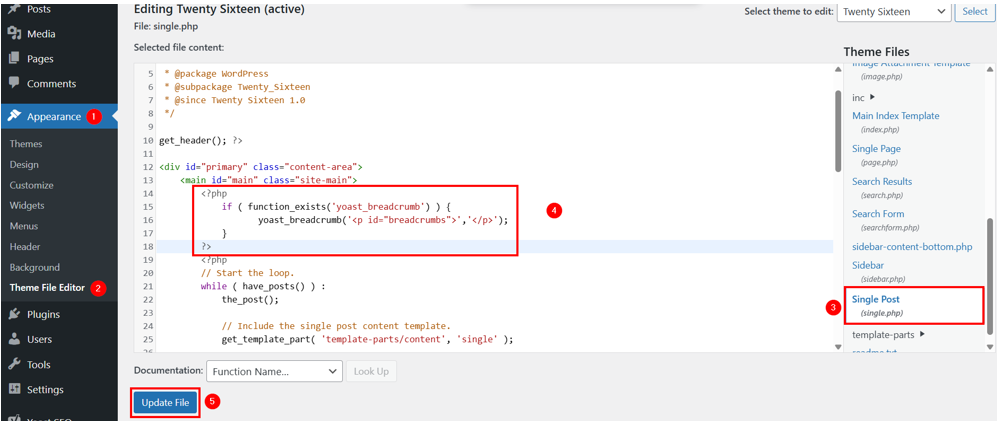
Here’s how it appears on the front end:

Note: We don’t recommend editing the theme first directly; instead, use a child theme. Additionally, if you don’t have access to the WordPress dashboard, you can access your WordPress website’s files using File Manager or an FTP client (FileZilla).
When you edit theme files, it affects the theme globally. For instance, we inserted a PHP code snippet in the single.php file, which displays WordPress breadcrumbs on all posts.
What if you want to show breadcrumbs only on specific posts? If so, go through the following steps:
Open your post or page where you wish to add breadcrumbs. Type /yoast breadcrumbs and choose the Yoast Breadcrumbs block.
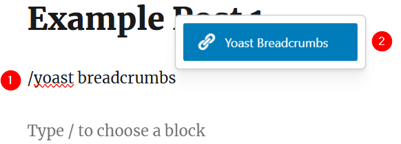
After inserting, click Save to save your post/page.
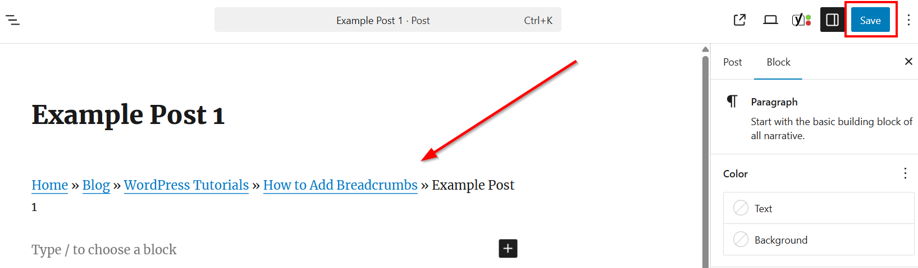
However, if you’re using Classic Editor, use to add WordPress breadcrumbs. You can use the same shortcode in the Block Editor as well.
For AIOSEO
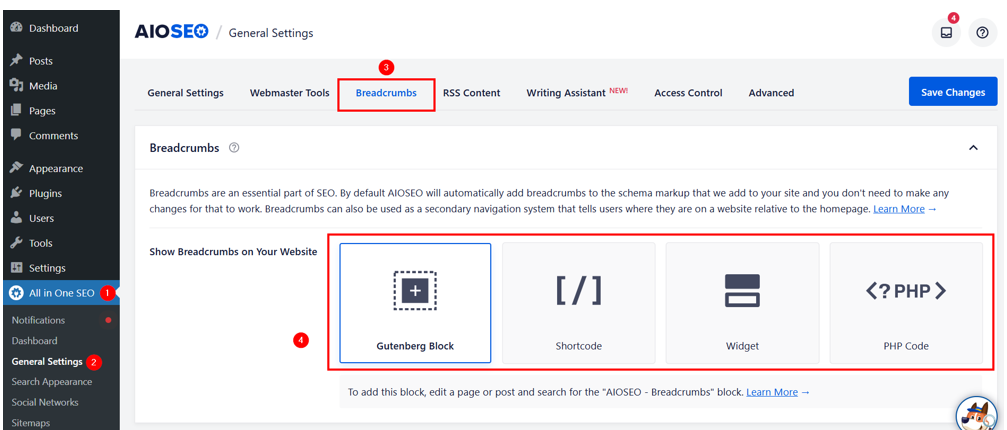
Navigate to All in One SEO → General Settings. Click Breadcrumbs. Here, you can modify the display settings, such as separator style and link format, and choose the method to add breadcrumbs.
The AIOSEO plugin provides 4 methods to add WordPress breadcrumbs:
- Using Gutenberg Block Editor.
- Using Shortcode.
- Using PHP Code.
- Using WordPress Widget.
Don’t forget to save your settings in AIOSEO by clicking Save Changes in the top right corner.
We’ve already learned the first 3 methods in the previous section while using Yoast SEO. The process is the same; however, you must:
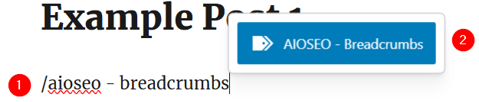
Choose AIOSEO – Breadcrumbs while using the Gutenberg Block Editor.
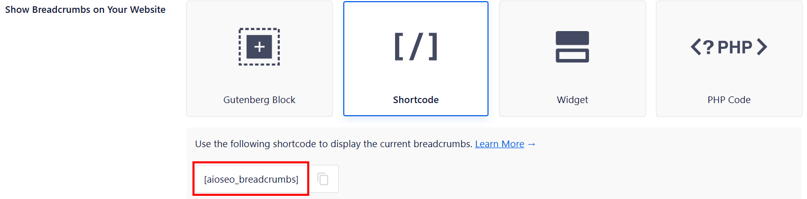
Use shortcode.
Add the following code to theme files:
<?php if( function_exists( 'aioseo_breadcrumbs' ) ) aioseo_breadcrumbs(); ?>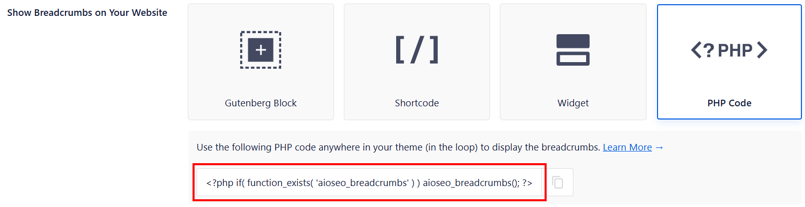
Now, to use the 4th method, follow these steps:
First, ensure you’ve selected Widget at All in One SEO → General Settings → Breadcrumbs and saved settings.
After that, go to Appearance → Widgets in the WordPress dashboard. Click + and search for AISEO – Breadcrumbs. Once it appears, click it to add. Lastly, don’t forget to click Update to save changes.
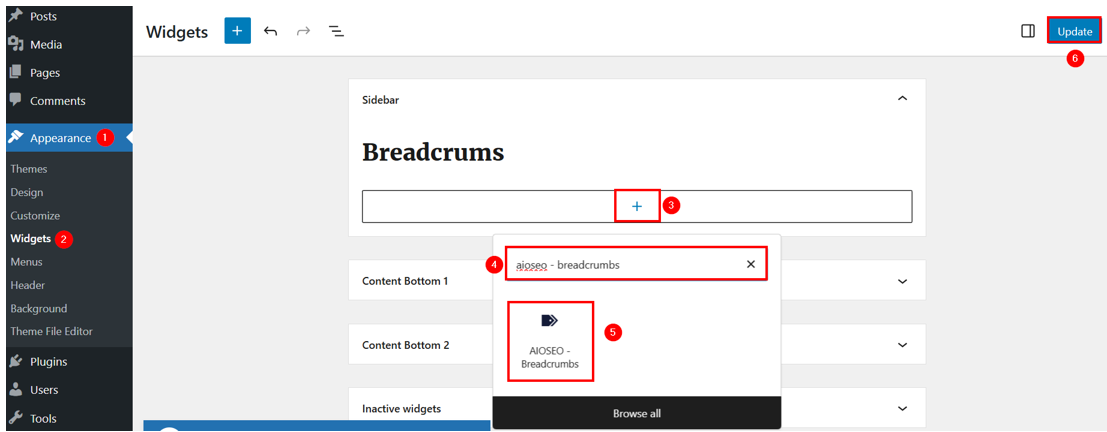
Note: If you’re using the paid AIOSEO plugin, you can use the AIOSEO – Breadcrumbs widget.
Get high-performance WordPress Hosting with LiteSpeed caching, daily backups, free SSL, and a user-friendly control panel for easy site management.
Plus, our expert support team is available to help you with setup, troubleshooting, and everything in between.
Use a WordPress Theme Supporting Built-in Breadcrumbs
WordPress themes don’t just control how your WordPress website looks; they can also influence its functionality. Some themes include built-in breadcrumb support, allowing you to add breadcrumb navigation without using additional plugins.
However, using a theme to add breadcrumbs has its ups and downs. If you’re starting a new WordPress site or planning a redesign, choosing a theme with breadcrumb support is a simple way to add navigation links. But if you already have a specific theme and brand identity, switching themes to get breadcrumbs isn’t practical. In that case, using a plugin or adding custom code may be a better option.
If you’re ready to use a theme that includes breadcrumbs, here are two popular options:
- OceanWP
- Astra.
Let’s see how to add WordPress breadcrumbs using these themes:
First, you need to install your required theme. Then, go through the following steps:
For Astra
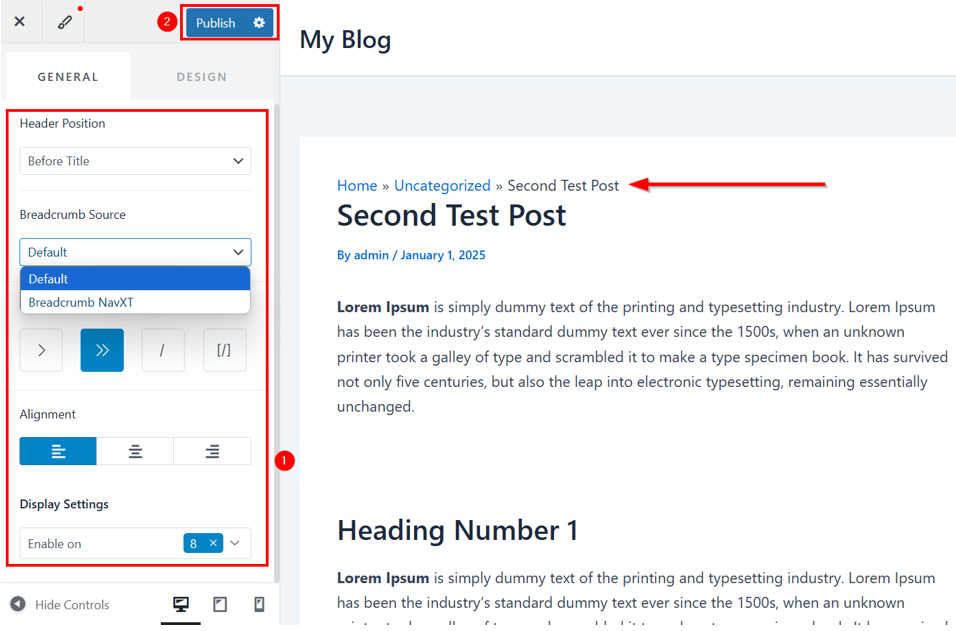
Go to WordPress Dashboard → Appearance → Customize → General.
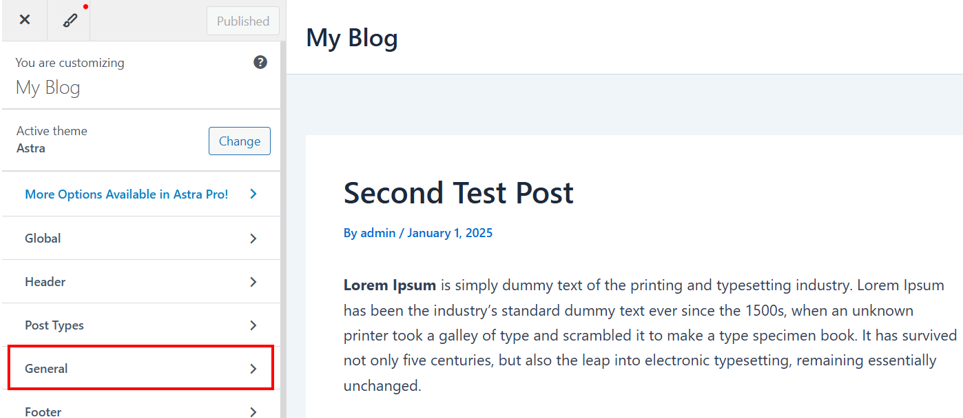
Click Breadcrumbs.
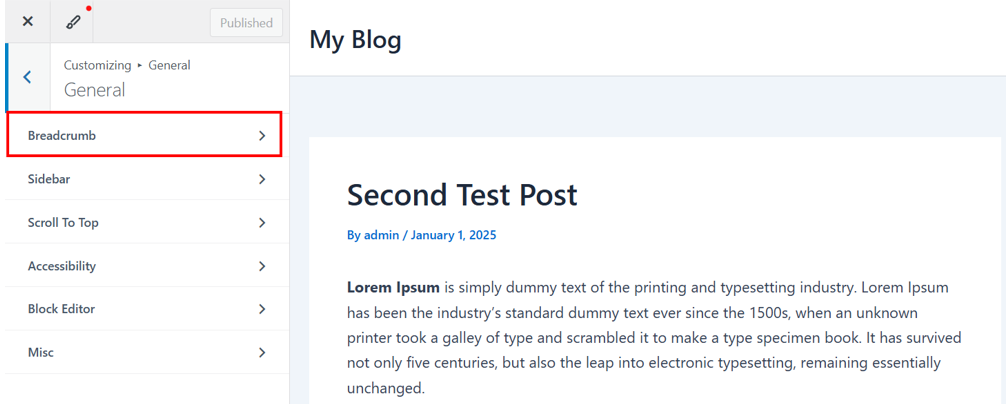
In the Breadcrumbs section, choose:
- Where to display the breadcrumbs.
- Breadcrumb source. If you’ve installed the Breadcrumb NavXT plugin, you can choose its settings. If you do this, the theme’s built-in breadcrumb settings will be replaced by the Breadcrumb NavXT plugin’s settings. It means the WordPress breadcrumb shown on your site will be according to the settings you made in the Breadcrumb NavXT plugin.
- A separator.
- Breadcrumb alignment.
- And display settings.
You may also switch to the DESIGN tab to style the breadcrumb in WordPress. You can change the text color, separator color, color of the link and background, and spacing to match your website’s design.
Once you’re satisfied with the breadcrumb placement and styling, click Publish to save the changes.
For OceanWP
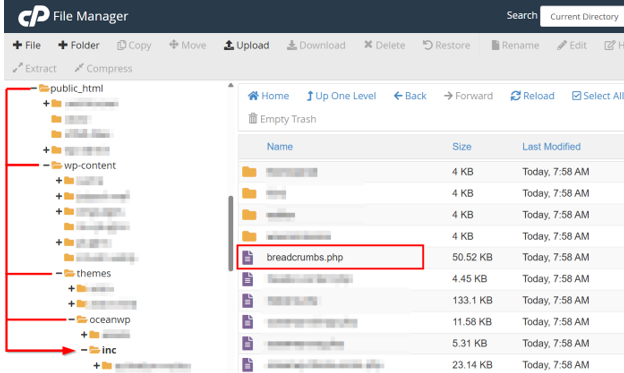
In OceanWP Version 4.0.8, breadcrumbs for posts are enabled by default because the theme has a breadcrumbs.php file at:
public_html/wp-content/themes/oceanwp/incSo, you don’t have to do anything to add WordPress breadcrumbs for your posts.
However, if you wish to enable breadcrumbs for pages as well, then follow the steps given below:
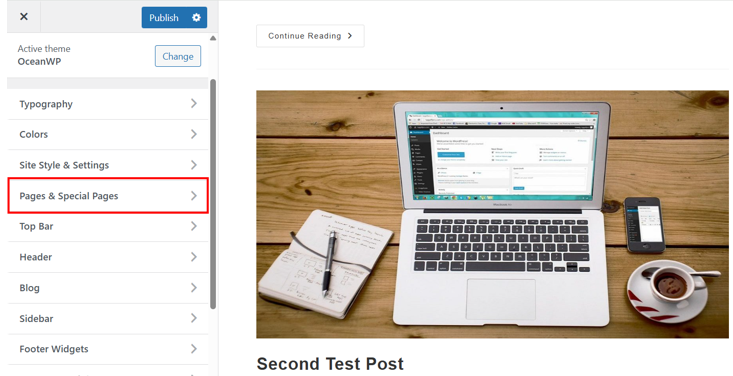
Navigate to WordPress Dashboard → Appearance → Customize → Page & Special Pages.
Scroll down to Page Title and click Page Breadcrumbs.
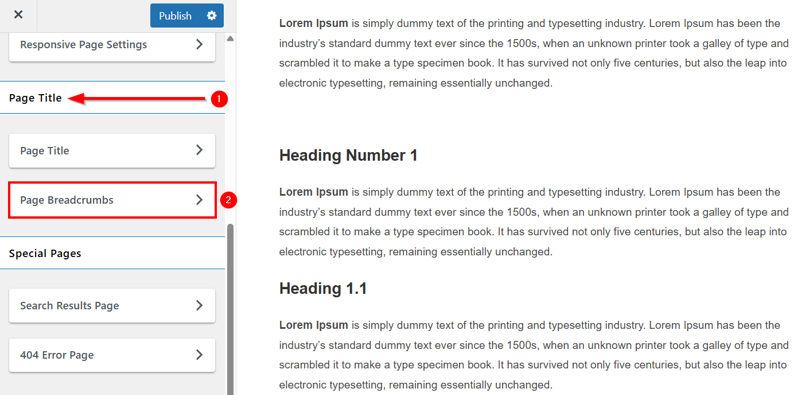
Here, you can enable WordPress breadcrumbs. Additionally, you can change font, its source, position, and color.
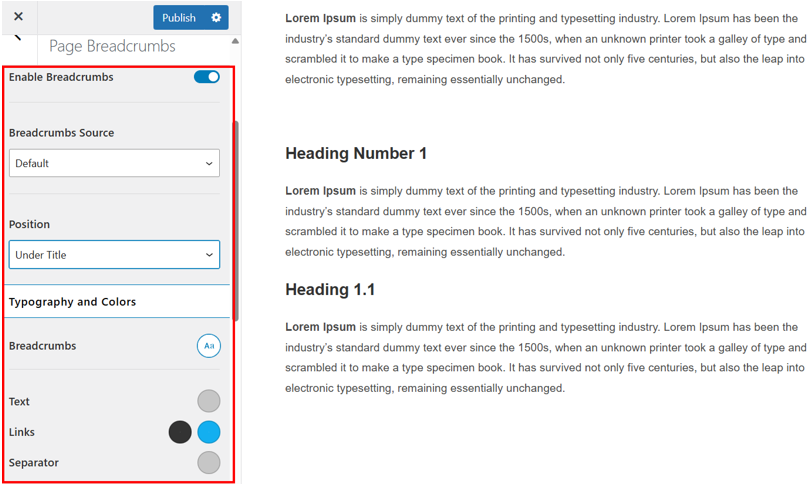
If you scroll down to Additional Settings, you can also customize:
- Breadcrumbs HomePage Settings.
- Breadcrumbs Trail Settings.
- Breadcrumbs Taxonomy Settings.
- Breadcrumbs Custom Texts.
After that, click Publish to make your changes live.
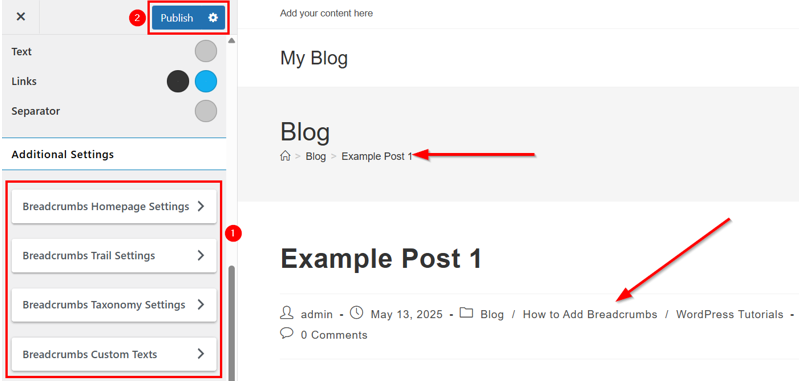
However, if you wish to add WordPress breadcrumbs to a specific post or page, open the content editor. Then, add the following shortcode:
[oceanwp_breadcrumb]You can also add this shortcode to a widget area for displaying breadcrumbs in sidebars or footers.
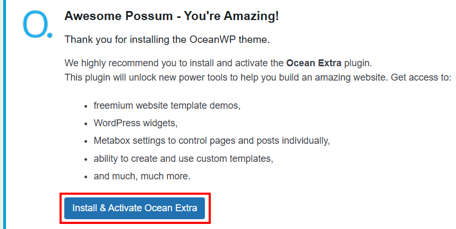
However, this shortcode only works if you are installing and activating the Ocean Extra plugin. You don’t need to download it manually. You’ll get the following popup as soon as you install the OceanWP theme, so click Install & Activate Ocean Extra.
Both OceanWP and Astra offer simple methods to add and customize breadcrumbs without plugins. While OceanWP uses shortcodes for flexible placement, Astra relies on the Customizer for a more integrated experience. Choose the one that aligns with your design and functionality requirements.
Add WordPress Breadcrumbs Manually
If your WordPress theme doesn’t have built-in breadcrumb support and you don’t wish to use a plugin, you can manually add breadcrumbs by inserting custom code into your theme files. Before you do this, we recommend creating a backup of your website or using a child theme to avoid future issues.
Then, go through the following step-by-step guide:
Step 1: Create a Breadcrumb Function
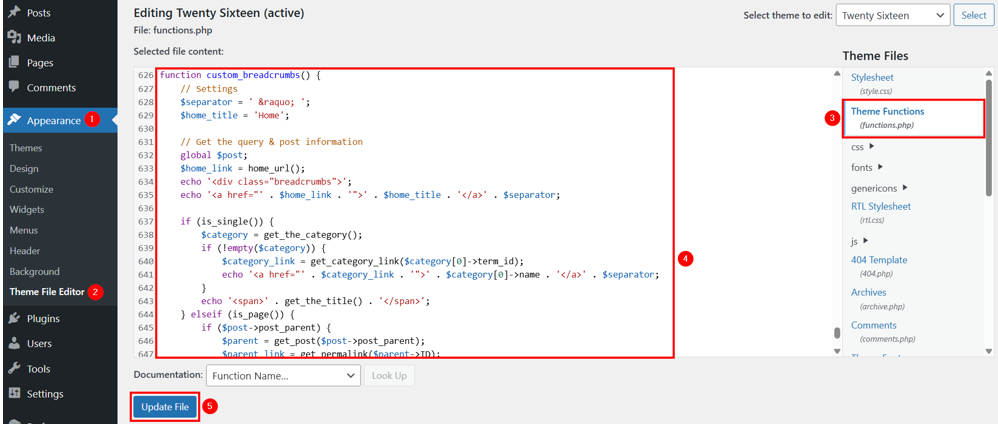
Go to WordPress Dashboard → Appearance → Theme File Editor. Click the functions.php file of your active theme. Once it’s opened, scroll to the bottom and add the following code:
function custom_breadcrumbs() {
// Settings
$separator = ' » ';
$home_title = 'Home';
// Get the query & post information
global $post;
$home_link = home_url();
echo '<div class="breadcrumbs">';
echo '<a href="' . $home_link . '">' . $home_title . '</a>' . $separator;
if (is_single()) {
$category = get_the_category();
if (!empty($category)) {
$category_link = get_category_link($category[0]->term_id);
echo '<a href="' . $category_link . '">' . $category[0]->name . '</a>' . $separator;
}
echo '<span>' . get_the_title() . '</span>';
} elseif (is_page()) {
if ($post->post_parent) {
$parent = get_post($post->post_parent);
$parent_link = get_permalink($parent->ID);
echo '<a href="' . $parent_link . '">' . $parent->post_title . '</a>' . $separator;
}
echo '<span>' . get_the_title() . '</span>';
} elseif (is_category()) {
echo '<span>' . single_cat_title('', false) . '</span>';
} elseif (is_tag()) {
echo '<span>' . single_tag_title('', false) . '</span>';
} elseif (is_search()) {
echo '<span>Search Results for: ' . get_search_query() . '</span>';
} elseif (is_404()) {
echo '<span>404 - Page Not Found</span>';
}
echo '</div>';
}
Then, click Update File to save changes.
This function creates a WordPress breadcrumb structure that handles single posts, pages, categories, tags, search pages, and 404 errors. You can customize the separator and text as required.
Step 2: Insert WordPress Breadcrumb Function in Theme Templates
Now, you need to decide where to display the breadcrumbs. Common places include:
header.php
single.php
page.php
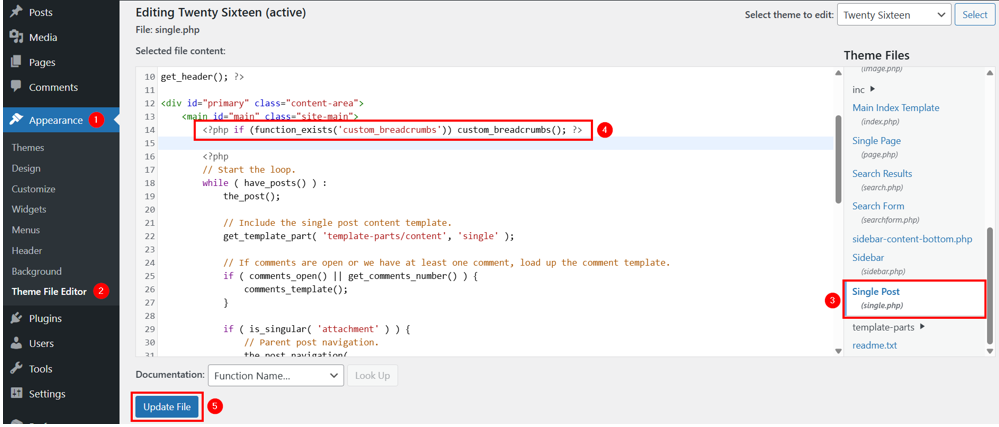
We edit this file for this section example. To do the same, open the single.php file and add the following PHP statement:
<?php if (function_exists('custom_breadcrumbs')) custom_breadcrumbs(); ?>Place it where you want your WordPress breadcrumbs to display. And click Update File to save recent changes.
Here’s how it looks on the front end:

Step 3: Add CSS to Style WordPress Breadcrumbs (Optional)
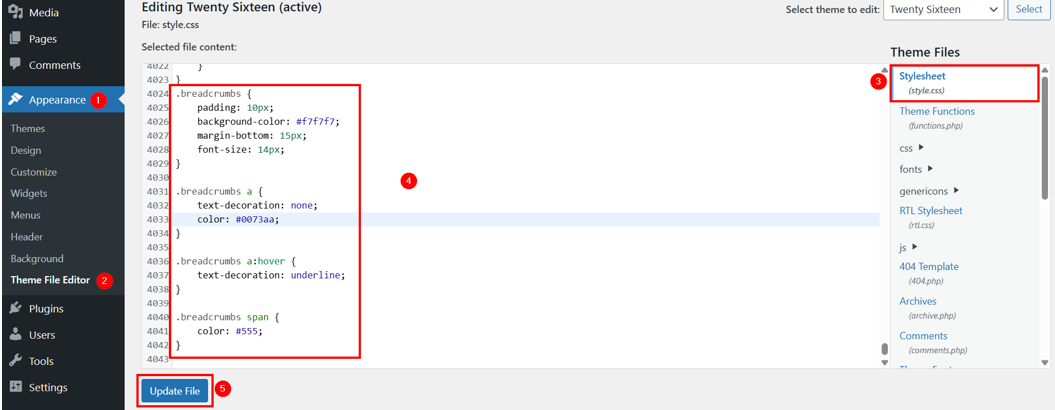
If you want to customize the breadcrumbs, then open the style.css file under Appearance → Theme File Editor. Scroll to the bottom of the file and add the following CSS code:
.breadcrumbs {
padding: 10px;
background-color: #f7f7f7;
margin-bottom: 15px;
font-size: 14px;
}

.breadcrumbs a {
text-decoration: none;
color: #0073aa;
}

.breadcrumbs a:hover {
text-decoration: underline;
}

.breadcrumbs span {
color: #555;
}
This CSS styles the breadcrumbs to have a background, padding, and link colors.

Here’s how it looks now:
![Strip Banner Text - Our WordPress Hosting servers are optimized for top website performance. [See Plans]](https://www.hosted.com/articles/wp-content/uploads/2025/05/wordpress-breadcrumbs-2-1024x229.webp "Our WordPress Hosting servers are optimized for top website performance")
FAQS
How do breadcrumbs affect SEO?
Breadcrumbs enhance SEO by providing a clear content hierarchy that search engines can easily crawl. They also improve visitor experience, reducing bounce rate and increasing dwell time, both of which are positive SEO signals.
What is Schema.org markup, and how does it relate to WordPress breadcrumbs?
Schema.org markup is structured data that helps search engines understand the context of breadcrumb links. Adding Schema.org markup to your breadcrumbs can enable rich snippets in SERPs, making your links more prominent and clickable.
Are breadcrumbs necessary for small websites?
Even small websites can benefit from breadcrumbs, especially if they have multiple pages or a blog section. Breadcrumbs provide a clear path for users and help search engines understand the content structure, making it easier to navigate and index.
Do WordPress breadcrumbs work on mobile devices?
Yes, breadcrumbs are typically responsive by default. However, you should test them on different screen sizes to ensure they remain readable and functional. Adjusting the CSS can help improve visibility on mobile devices.
Do breadcrumbs impact page load speed?
Generally, breadcrumbs have minimal impact on page load speed. However, poorly coded breadcrumb functions or plugins can add unnecessary database queries or scripts, slowing down your site. Choose lightweight plugins or clean custom code to avoid performance issues.
Other Related Tutorials
– How To Troubleshoot & Fix Common WordPress Issues
– How To Upload HTML Files To WordPress: 3 Easy Methods
– How To Add Featured Posts In WordPress: 6 Easy Ways
– WordPress Patterns: How To Create & Use Them
– How To Create A WordPress Sticky Header: 4 Easy Ways
- About the Author
- Latest Posts

Rhett isn’t just a writer at Hosted.com – he’s our resident WordPress content guru. With over 6 years of experience as a content writer, with a background in copywriting, journalism, research, and SEO, and a passion for websites.
Rhett authors informative blogs, articles, and Knowledgebase guides that simplify the complexities of WordPress, website builders, domains, and cPanel hosting. Rhett’s clear explanations and practical tips provide valuable resources for anyone wanting to own and build a website. Just don’t ask him about coding before he’s had coffee.