


 Contact Support
 Sign In
Learn how to edit HTML code in cPanel. Sometimes you may need to edit your website’s HTML files directly, whether it’s to fix a typo, update content, add tracking codes, or customize design elements.
Hosted.com® makes this easy with cPanel’s File Manager, which includes a built-in HTML Editor.
TABLE OF CONTENTS
How to Edit HTML Code in cPanel
Follow these steps to edit your HTML code safely:
1. Login to Your Hosted.com® Account.
2. Go to the Manage Services drop-down section and choose your hosting plan and click Manage next to your domain.

3. Next click Login next to Control Panel, to access cPanel.

4. Under Files, click File Manager.
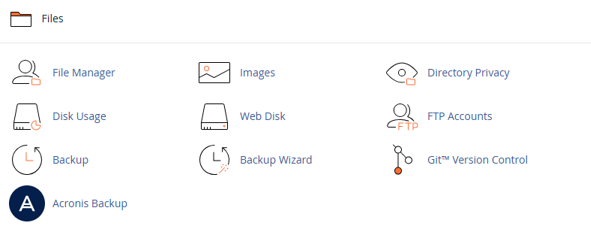
5. Navigate to the public_html folder (this is where your main website files are stored).
6. Right-click the file you want to edit (e.g., index.html).
Choose Edit or HTML Editor
7. Select Edit for plain code editing.
8. Choose HTML Editor for a more visual, WYSIWYG-style editor.
9. Update the code or content as required.
10. Click Save Changes in the top-right corner.
11. Visit your site in a browser to confirm everything displays correctly.
Additional Information
- Use the Preview Option: Before saving, you can preview changes in cPanel’s editor to ensure your edits display correctly.
- Check File Encoding: Keep files in UTF-8 encoding to avoid broken characters on your site.
- Browser Cache: Clear your browser cache after edits; otherwise, you may still see the old version of your page.
- Error Recovery: If you make an error, you can restore an earlier version of the file using Hosted.com®’s backup services or cPanel’s Backup Wizard.
- Editing Other File Types: In addition to HTML, cPanel’s File Manager also allows you to edit PHP, CSS, and JavaScript files directly.
When Should You Edit HTML?
Editing HTML manually can be useful for:
- Correcting or updating website text.
- Adding scripts (e.g., Google Analytics or Meta Pixel).
- Adjusting layout or design without a full rebuild.
- Troubleshooting display issues.
NOTE:
Always back up your files before making changes. Incorrect edits may cause your website to display incorrectly.
Why Edit HTML in cPanel Instead of Downloading Files?
While you can always download files via FTP or cPanel, edit them locally, and re-upload, editing in cPanel has these advantages:
- Speed: Make changes instantly, without file transfers.
- Accessibility: Edit from any device with internet access.
- No Extra Tools: No need for FTP software or code editors.


