Hosted.com®
  • Domains New!
    Domain Registration Register Domains

    Quick and easy domain name registration

    AI Domain Name Generator AI Domain Name Generator New!

    Create the perfect domain using our AI generator

    Domain Transfer Transfer Domains

    Hassle-free transfer of domains to us

    Whois Lookup Whois Lookup

    Check domain name registrant information

    Bulk Domain Registrations Bulk Domain Registrations

    Find and register multiple domain names in one go

    Bulk Domain Transfers Bulk Domain Transfers

    Transfer multiple domains to us at once

  • Hosting
    cPanel Web Hosting cPanel Web Hosting

    cPanel Web Hosting with an easy control panel

    Email Hosting Email Hosting

    Hosting for professional domain-based emails

    Website Builder Website Builder

    Drag & drop widgets and professionally designed templates

  • WordPress Hosting
  • SSL Certificates
  • Help
    Open a Ticket Open a Ticket

    Stuck? Send us your query for help

    About Hosted.com® About Us

    Find out more about Hosted.com®

    Hosted.com® Knowledgbase Knowledgebase

    Plenty of helpful information to assist you

    Hosted.com® Network Status Network Status

    Check out our Network status anytime

    Hosted.com® - Approved Providers Approved Providers

    Some of the accredited suppliers we use

    Hosted.com® Blog Blog

    Insights and tips to boost your business

    Hosted.com® Tutorials & Articles Tutorials & Articles

    Articles and Guides to help you succeed

  • Contact Support Contact Support
    Sign In Sign In
Contact Support Contact Support
Sign In Sign In
  • Domains New!
  • Domain Registration Register Domains

    Quick and easy domain name registration

    AI Domain Name Generator AI Domain Name Generator New!

    Create the perfect domain using our AI generator

    Domain Transfer Transfer Domains

    Hassle-free transfer of domains to us

    Whois Lookup Whois Lookup

    Check domain name registrant information

    Bulk Domain Registrations Bulk Domain Registrations

    Find and register multiple domain names in one go

    Bulk Domain Transfers Bulk Domain Transfers

    Transfer multiple domains to us at once

  • Hosting
  • cPanel Web Hosting cPanel Web Hosting

    cPanel Web Hosting with an easy control panel

    Email Hosting Email Hosting

    Hosting for professional domain-based emails

    Website Builder Website Builder

    Drag & drop widgets and professionally designed templates

  • WordPress Hosting
  • SSL Certificates
  • Help
  • Open a Ticket Open a Ticket

    Stuck? Send us your query for help

    About Hosted.com® About Us

    Find out more about Hosted.com®

    Hosted.com® Knowledgbase Knowledgebase

    Plenty of helpful information to assist you

    Hosted.com® Network Status Network Status

    Check out our Network status anytime

    Hosted.com® - Approved Providers Approved Providers

    Some of the accredited suppliers we use

    Hosted.com® Blog Blog

    Insights and tips to boost your business

    Hosted.com® Tutorials & Articles Tutorials & Articles

    Articles and Guides to help you succeed

How To Delete An Email Account On Your iPad

< All Topics
  • Main
  • Emails
  • How To Delete An Email Account On Your iPad
   
Summarize with:
ChatGPT
Claude
Perplexity

Managing your email accounts across devices is an important part of keeping your communication organized and secure. Whether you are removing an outdated account, switching providers, or simply decluttering your device, knowing how to delete an email account from your iPad properly ensures your information stays updated and easy to manage.

At Hosted.com®, we understand that having flexibility across devices is key. While your email account remains active on your hosting plan, removing it from your iPad only affects that specific device, giving you full control over where and how your emails are accessed.

This guide explains the steps to safely remove an email account from your iPad.

TABLE OF CONTENTS

  • How to Delete an Email Account on Your iPad
  • Additional Information
    • Login to Hosted.com® Account
    • Login to cPanel from your Hosted.com® Dashboard

How to Delete an Email Account on Your iPad

Follow these steps to remove an email account from your device:

1. Locate and tap the Settings icon on your iPad home screen.

2. Scroll down and select Mail, then tap Accounts.
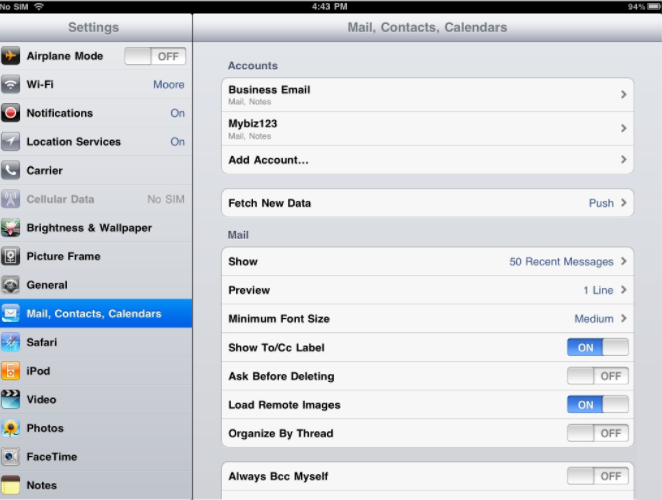
How To Delete An Email Account On Your iPad - iPad Email Settings

3. Choose the email account you wish to remove from the list.

4. Tap on the email account you wish to delete to open its settings.

5. Scroll down and tap Delete Account.

6. Tap Delete from My iPad to confirm.

IMPORTANT:

Deleting the account from your iPad will remove all emails, contacts, and calendar data associated with that account from the device.

The email account will no longer appear in your list of accounts and will no longer sync with your iPad.

Additional Information

  • Removing an email account from your iPad only deletes it from the device itself and does not cancel or delete the account from your Hosted.com® hosting plan or server.
  • Any emails stored on the server will remain intact and can still be accessed from webmail or other connected devices.
  • If you are using IMAP, your emails are synchronized with the server, meaning they will still be available when you log in from another device.
  • If you are using POP, some emails may only exist on your iPad, so it is important to ensure any important messages are backed up before deletion.
  • Deleting an account will also remove associated contacts, notes, and calendars that were synced with that email account.
  • If you plan to add the account again later, ensure you have the correct email settings and password available.
  • Removing unused accounts can help improve device performance and reduce unnecessary notifications.
  • If you experience issues removing the account, restarting your device or checking for iOS updates can often resolve the problem.
  • For assistance with your email settings or account access, the Hosted.com® support team is available to help.

Login to Hosted.com® Account

1. Go to the Hosted.com® website Account Login page.

2. Enter your Email and Password and click the Sign In button.

How To Export A Databases Via SSH In cPanel - Hosted.com® Sign In Webpage

3. You will see the Hosted.com® Dashboard, displaying the Manage Account menu on the left and your Account Information, Account Overview and Open Support Tickets on the right.

Hosted.com® Dashboard Manage Services

Login to cPanel from your Hosted.com® Dashboard

4. Click on Manage Services to view the sub-dropdown menu and select the hosting package for the domain you want to work with – in our example we are using WordPress Hosting.

5. Click the Manage button to the right of the domain name you want to access.

Hosted.com® Dashboard WordPress Hosting

6. The display will now show Product Information, Quick Manage, Resource Usage and Site Statistics for that domain name.

Hosted.com® Dashboard Manage Services

7. Under Product Information, scroll down to Control Panel, which will display cPanel to the right, and click on the Login button.

Hosted.com® cPanel Dashboard

8. The cPanel Dashboard will now be displa

Views17
Was this article helpful?
Please Share Your Feedback
How Can We Improve This Article?
Previous How To Delete A Email Account On Your iPhone
Next How To Embed A phpList Subscription Form Your Website

Related Articles

  • Do I Get Email Accounts With My WordPress Hosting?
  • How To Setup A Windows Live Mail Email Account
  • What is the Limit of Email Recipients for an email?
  • How to View Your Emails Remotely
  • How To View Message Headers For Email
  • How To Verify Domain Ownership With WHOIS
  • How To Troubleshoot Mail In Outlook
  • How To Troubleshoot Email Receiving Problems
  • How To Protect Against Spoofing
  • Socket Error - Fix Timeout When Sending Large Attachments

Categories

  • 14 Billing
  • 94 cPanel
  • 45 Domains
  • 96 Emails
  • 24 General
  • 115 Hosting
  • 7 Pre-Sales
  • 56 SSLs
  • 23 Website Builder
  • 50 WordPress
Hosted.com®

We make hosting simple

Hosted.com® is a Web Hosting and Domain name provider with a soft spot for start-ups and small businesses. We believe you are the star of the show, and our products and plans underpin this belief.

Stripe

Read more about our Secure Payment methods here.

Hosting

  • cPanel Web Hosting
  • WordPress Hosting
  • Website Builder
  • Email Hosting

Company

  • Contact Us
  • About Us

Domains

  • Register Domains
  • Transfer Domains
  • Bulk Register
  • Bulk Transfer
  • Whois Lookup

Security

  • SSL

Resources

  • Support
  • Knowledgebase
  • Blog
  • Articles
  • Payment Methods
  • Affiliates
  • Sitemap

Legal

  • Universal Terms & Conditions
  • Domain Expiration Policy
  • Abuse Policy
  • Privacy Policy
  • Billing Policy
Find us on Instagram
Find us on Facebook
Find us on LinkedIn
Find us on Pinterest
Find us on X / Twitter
Find us on YouTube
Google My Business
Copyright © 2026 Hosted.com®. All Rights Reserved. T.1779666628.6691
        {
    "auth": 0.09246516227722168,
    "total": 1779666628.669141
}